
共计 2914 个字符,预计需要花费 8 分钟才能阅读完成。

为什么需要 Agent Teams
Claude Agent Teams 解决了单智能体 (Single Agent) 模式的两个关键瓶颈:任务处理维度单一和复杂场景的协作断裂。当需要同时处理客户咨询、数据清洗和报告生成时,单智能体需要串行切换角色,而多智能体团队可并行处理且保持上下文连贯。
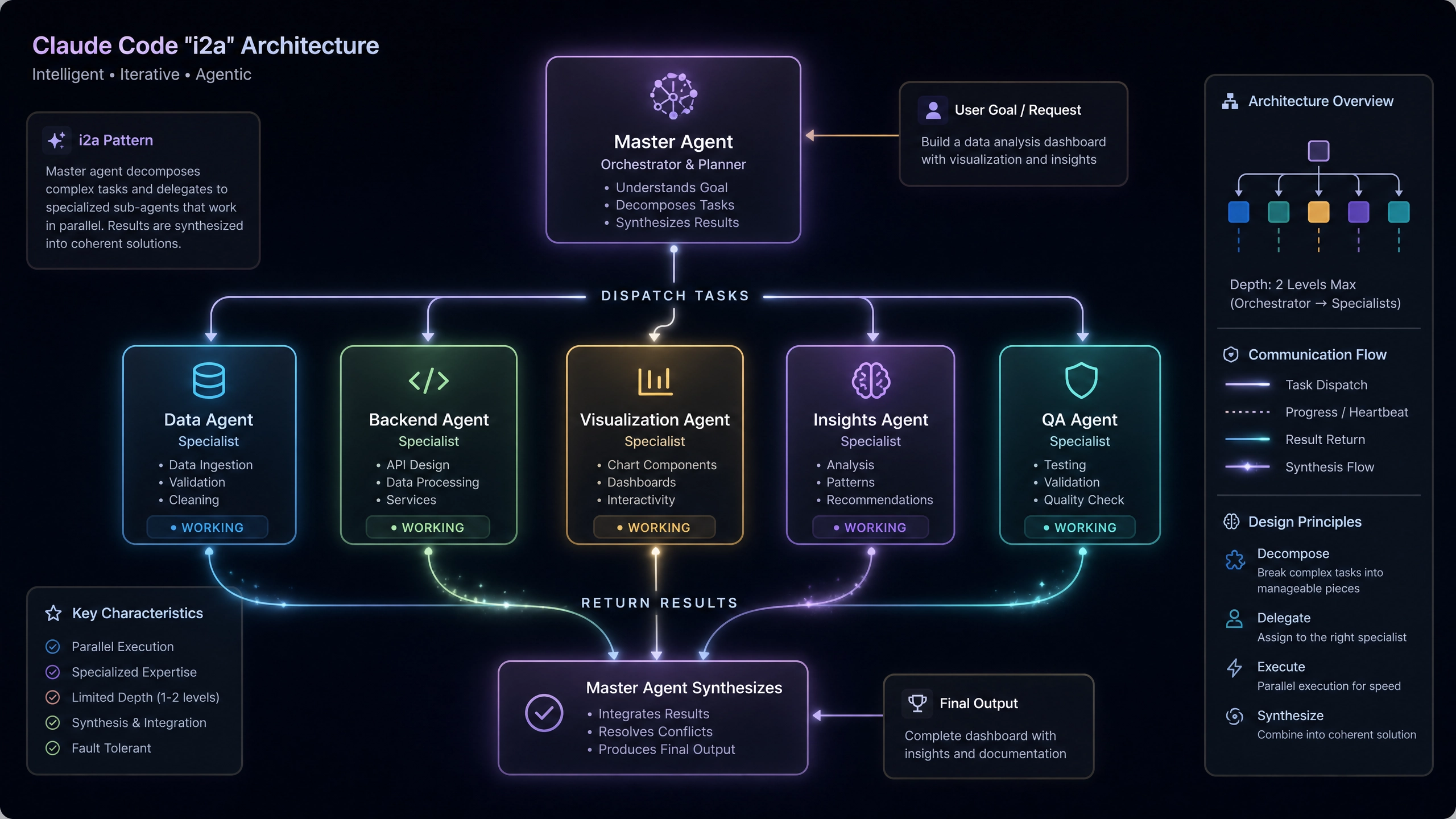
核心组件拆解
角色定义模板
团队配置采用声明式 JSON Schema,以下是一个客服场景的三角色模板:
{
  "$schema": "http://json-schema.org/draft-07/schema#",
  "team_name": "CustomerSupportTeam",
  "agents": [
    {
      "role": "Receptionist",
      "description": "Handle initial greeting and intent classification",
      "temperature": 0.3,
      "max_tokens": 128
    },
    {
      "role": "TechnicalExpert",
      "description": "Solve API integration questions",
      "temperature": 0.7,
      "max_tokens": 512
    },
    {
      "role": "BillingSpecialist",
      "description": "Process refund/payment inquiries",
      "temperature": 0.5,
      "max_tokens": 256
    }
  ],
  "message_routing": {
    "default": "Receptionist",
    "rules": [
      {"if_contains": ["error", "API"],
        "route_to": "TechnicalExpert"
      }
    ]
  }
}
Python 初始化实战
使用官方 SDK 进行团队初始化的完整示例:
from claude_team import TeamSession
from typing import Dict, Any
import json

def init_team(config_path: str) -> TeamSession:
    """
    初始化智能体团队
    :param config_path: 角色定义 JSON 文件路径
    :raises ValueError: 当配置文件格式错误时抛出
    """
    try:
        with open(config_path) as f:
            config = json.load(f)

        # 验证必要字段
        required_fields = {"team_name", "agents", "message_routing"}
        if not all(field in config for field in required_fields):
            raise ValueError("Missing required field in config")

        return TeamSession(team_name=config["team_name"],
            agent_configs=config["agents"],
            routing_rules=config["message_routing"]
        )
    except json.JSONDecodeError as e:
        raise ValueError(f"Invalid JSON format: {str(e)}")
    except FileNotFoundError:
        raise ValueError("Config file not found")

# 使用示例
if __name__ == "__main__":
    try:
        team = init_team("./team_config.json")
        print(f"Team {team.team_name} initialized with {len(team.agents)} agents")
    except ValueError as e:
        print(f"Initialization failed: {str(e)}")
消息路由策略
使用 Mermaid 绘制的路由决策流程图(基于 Claude API v2023-12-01):
graph TD
    A[新消息到达] --> B{包含关键词?}
    B -- 是 --> C[匹配路由规则]
    B -- 否 --> D[默认接待员处理]
    C --> E{存在多规则冲突?}
    E -- 是 --> F[按规则优先级排序]
    E -- 否 --> G[分配到对应角色]
    F --> H[选择最高优先级规则]
    H --> G
    G --> I[加入处理队列]
生产环境注意事项
会话上下文管理
- 采用会话分片 (Session Sharding) 策略,每个用户会话绑定到固定 agent 组合
- 上下文缓存使用 Redis 的 Hash 结构,键格式:
team:{team_id}:session:{session_id} - 设置 TTL 为 30 分钟避免内存泄漏
错误重试机制
推荐指数退避算法实现:
import time
from tenacity import retry, stop_after_attempt, wait_exponential

@retry(stop=stop_after_attempt(3),
    wait=wait_exponential(multiplier=1, min=4, max=10)
)
def send_to_agent(agent, message):
    response = agent.process(message)
    if response.status_code == 429:
        raise Exception("Rate limited")
    return response
敏感信息过滤
使用正则表达式捕获常见敏感信息模式:
import re

SENSITIVE_PATTERNS = {"credit_card": r"\b(?:4[0-9]{12}(?:[0-9]{3})?|5[1-5][0-9]{14})\b",
    "api_key": r"\b(sk_[a-zA-Z0-9]{32}|AKIA[0-9A-Z]{16})\b"
}

def sanitize_input(text: str) -> str:
    for _, pattern in SENSITIVE_PATTERNS.items():
        text = re.sub(pattern, "[REDACTED]", text)
    return text
性能优化指南
并发控制
速率限制计算公式:
最大并发数 = min(
    团队总 token 限制 / 单个请求平均 token 消耗,
    物理 CPU 核心数 × 2
)
监控指标
Prometheus 指标建议:
– claude_team_latency_seconds 分位数统计
– claude_agent_queue_size 实时队列深度
– claude_routing_errors_total 路由失败计数
延伸思考
- 知识共享机制:是否需要引入中央知识库?如何解决不同领域 agent 的知识冲突?
- 动态权重调整:基于响应质量(如用户评分)自动调整 agent 优先级时,如何避免马太效应?
- 审计日志存储:在 GDPR 合规要求下,对话日志应该采用何种加密存储方案?保留周期如何设定?
在实际部署中,我们发现团队协作效率与路由规则复杂度呈倒 U 型关系。建议初期保持简单路由策略,随着业务复杂度增长再逐步引入更精细化的控制逻辑。
正文完


