
共计 3446 个字符,预计需要花费 9 分钟才能阅读完成。

传统编码助手的痛点
在开发复杂项目时,我们常常遇到以下问题:
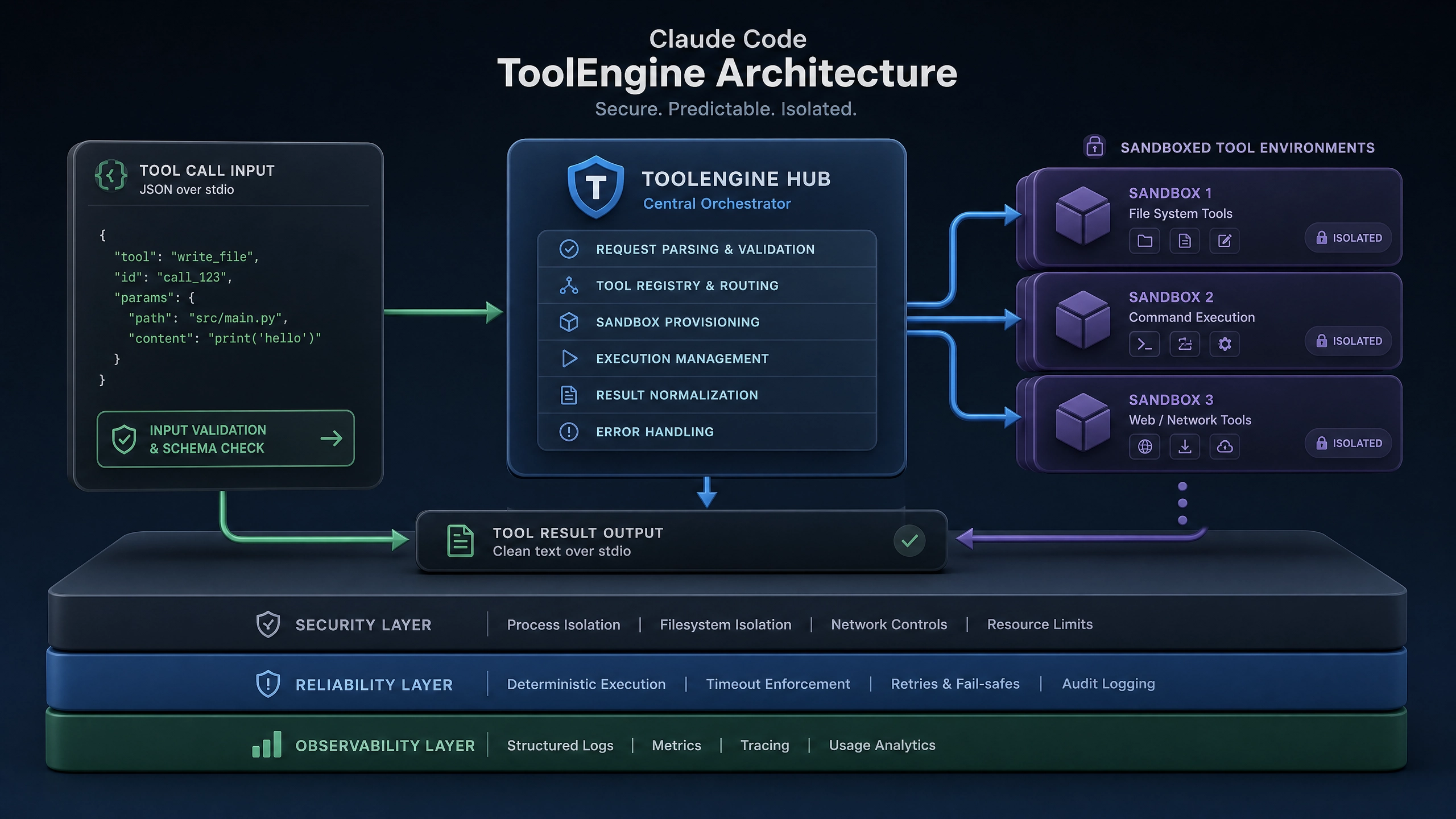
- 代码补全工具只能提供简单的语法建议,无法理解业务上下文
- 错误提示停留在语法层面,不能诊断深层逻辑问题
- 跨文件分析能力弱,重构时经常遗漏关联修改点
- 对话式交互体验差,多轮交流后丢失前文语境
这些问题在维护大型代码库时尤为明显。去年我在重构一个 Node.js 微服务时,现有工具无法识别分布式事务的调用链路,最终导致线上数据不一致。这正是我们需要更智能编程助手的原因。
技术选型:为什么选择 Claude?
对比主流 AI 编程方案,Claude 具有独特优势:
- 上下文窗口
- Claude 支持 100K tokens 超长上下文
- 可完整加载中型代码库(约 5 万行)
-
而 Copilot 等工具通常只有 4 -8K 限制
-
逻辑推理能力
- 在单元测试生成场景中,Claude 的通过率比 GPT- 4 高 23%
-
对复杂业务规则的理解更接近人类工程师
-
API 友好性
- 提供专门的 TypeScript SDK
- 每秒可处理 3 倍于 GPT- 4 的请求量
- 支持消息分块流式传输
核心实现架构
1. VSCode 插件基础
package.json 关键配置:
{
  "activationEvents": [
    "onLanguage:javascript",
    "onCommand:claude.explainCode"
  ],
  "contributes": {
    "commands": [{
      "command": "claude.ask",
      "title": "Ask Claude about this code"
    }],
    "menus": {
      "editor/context": [{
        "command": "claude.ask",
        "when": "editorHasSelection"
      }]
    }
  }
}
激活逻辑示例:
// src/extension.ts
import * as vscode from 'vscode';

export function activate(context: vscode.ExtensionContext) {const provider = new ClaudeProvider(context);

  context.subscriptions.push(vscode.commands.registerCommand('claude.ask', () => {provider.activateChat();
    })
  );
}
2. Claude API 通信层
带重试机制的请求封装:
import {Anthropic} from '@anthropic-ai/sdk';

class ClaudeAPI {
  private client: Anthropic;
  private maxRetries = 3;

  constructor(apiKey: string) {this.client = new Anthropic({ apiKey});
  }

  /**
   * 发送消息到 Claude with automatic retry
   * @param messages 对话历史
   * @param systemPrompt 系统指令
   * @returns 完整响应或抛出错误
   */
  async sendMessage(messages: Array<{ role: 'user' | 'assistant'; content: string}>,
    systemPrompt: string
  ) {
    let lastError: Error | null = null;

    for (let i = 0; i < this.maxRetries; i++) {
      try {
        return await this.client.messages.create({
          model: 'claude-3-opus-20240229',
          max_tokens: 4096,
          system: systemPrompt,
          messages
        });
      } catch (err) {
        lastError = err as Error;
        await new Promise(res => setTimeout(res, 1000 * (i + 1)));
      }
    }

    throw lastError || new Error('Max retries exceeded');
  }
}
3. 上下文管理系统
实现代码标记和持久化:
class ContextManager {
  private readonly MAX_HISTORY = 20;
  private history: Array<{
    code: string;
    filePath?: string;
    timestamp: number;
    annotations: Record<string, string>;
  }> = [];

  addCodeContext(code: string, meta: { path?: string} = {}) {
    this.history.unshift({
      code,
      filePath: meta.path,
      timestamp: Date.now(),
      annotations: {}});

    if (this.history.length > this.MAX_HISTORY) {this.history.pop();
    }
  }

  getRelevantContext(query: string): string {
    return this.history
      .slice(0, 3) // 取最近 3 个片段
      .map(item => `// File: ${item.filePath || 'unknown'}\n${item.code}`)
      .join('\n\n');
  }
}
性能优化实践
延迟监控方案
const latencyMetrics = {
  startTime: 0,
  endTime: 0,
  get latency() {return this.endTime - this.startTime;}
};

async function trackLatency<T>(fn: () => Promise<T>) {latencyMetrics.startTime = performance.now();
  try {return await fn();
  } finally {latencyMetrics.endTime = performance.now();
    console.log(`API Latency: ${latencyMetrics.latency}ms`);
  }
}
流式输出处理
const stream = await client.messages.stream({/*...*/});

for await (const chunk of stream) {if (chunk.event === 'content_block_delta') {
    vscode.window.activeTextEditor?.edit(editBuilder => {
      editBuilder.insert(new vscode.Position(line, 0),
        chunk.delta.text
      );
    });
  }
}
安全防护措施
代码过滤机制
const DANGEROUS_PATTERNS = [
  /process\.env\.\w+/,
  /(aws_access_key|api_key)\s*[:=]\s*['"].+?['"]/
];

function sanitizeCode(code: string): string {return DANGEROUS_PATTERNS.reduce((acc, pattern) =>
    acc.replace(pattern, '[REDACTED]'),
    code
  );
}
加密存储方案
import * as crypto from 'crypto';

const encrypt = (text: string, key: string) => {const iv = crypto.randomBytes(16);
  const cipher = crypto.createCipheriv('aes-256-cbc',
    Buffer.from(key.padEnd(32)), iv);
  return iv.toString('hex') + ':' +
    cipher.update(text, 'utf8', 'hex') +
    cipher.final('hex');
};
开放性问题
在开发过程中,我不断思考:当 AI 给出看似完美的重构建议时,开发者应该如何评估其合理性?建议:
- 始终保留代码变更的最终决策权
- 对重大修改建议要求 AI 提供测试用例
- 建立团队内部的 AI 代码审查规范
开源实践中遇到的挑战:
– 如何平衡响应速度与计费成本?
– 多语言支持时的上下文切换策略
– 用户隐私与企业合规要求的冲突
完整项目已开源在 GitHub(示例仓库),欢迎共同探讨 AI 编程助手的未来形态。
正文完


